|
OpenStack Newton : Run Instances
2016/10/22 |
|
Create and Start Virtual Machine Instance.
|
|
| [1] | Create a flavor (cpu, memory, disk (and others) specification) and create an instance and boot it. |
|
# create a flavor [root@dlp ~(keystone)]# openstack flavor create --id 0 --vcpus 1 --ram 2048 --disk 10 m1.small +----------------------------+----------+ | Field | Value | +----------------------------+----------+ | OS-FLV-DISABLED:disabled | False | | OS-FLV-EXT-DATA:ephemeral | 0 | | disk | 10 | | id | 0 | | name | m1.small | | os-flavor-access:is_public | True | | properties | | | ram | 2048 | | rxtx_factor | 1.0 | | swap | | | vcpus | 1 | +----------------------------+----------+[root@dlp ~(keystone)]# openstack flavor list +----+----------+------+------+-----------+-------+-----------+ | ID | Name | RAM | Disk | Ephemeral | VCPUs | Is Public | +----+----------+------+------+-----------+-------+-----------+ | 0 | m1.small | 2048 | 10 | 0 | 1 | True | +----+----------+------+------+-----------+-------+-----------+ # show the list of images [root@dlp ~(keystone)]# openstack image list +--------------------------------------+---------+--------+ | ID | Name | Status | +--------------------------------------+---------+--------+ | 255cfee5-ba9d-4f8d-8ef7-c65dbe65b8ee | CentOS7 | active | +--------------------------------------+---------+--------+ # create and boot an instance [root@dlp ~(keystone)]# openstack server create --flavor m1.small --image CentOS7 --security-group default CentOS_7
+--------------------------------------+------------------------------------------------+
| Field                                | Value                                          |
+--------------------------------------+------------------------------------------------+
| OS-DCF:diskConfig                    | MANUAL                                         |
| OS-EXT-AZ:availability_zone          |                                                |
| OS-EXT-SRV-ATTR:host                 | None                                           |
| OS-EXT-SRV-ATTR:hypervisor_hostname  | None                                           |
| OS-EXT-SRV-ATTR:instance_name        |                                                |
| OS-EXT-STS:power_state               | NOSTATE                                        |
| OS-EXT-STS:task_state                | scheduling                                     |
| OS-EXT-STS:vm_state                  | building                                       |
| OS-SRV-USG:launched_at               | None                                           |
| OS-SRV-USG:terminated_at             | None                                           |
| accessIPv4                           |                                                |
| accessIPv6                           |                                                |
| addresses                            |                                                |
| adminPass                            | mu5N6CUkNXBg                                   |
| config_drive                         |                                                |
| created                              | 2016-10-22T14:02:39Z                           |
| flavor                               | m1.small (0)                                   |
| hostId                               |                                                |
| id                                   | 4b80dce6-f3eb-4591-b924-37c719042c4e           |
| image                                | CentOS7 (255cfee5-ba9d-4f8d-8ef7-c65dbe65b8ee) |
| key_name                             | None                                           |
| name                                 | CentOS_7                                       |
| os-extended-volumes:volumes_attached | []                                             |
| progress                             | 0                                              |
| project_id                           | 150e205a8791426e8028a94699fb8848               |
| properties                           |                                                |
| security_groups                      | [{u'name': u'default'}]                        |
| status                               | BUILD                                          |
| updated                              | 2016-10-22T14:02:40Z                           |
| user_id                              | 0a28ee66b05f4c7b9709f316c5109e0a               |
+--------------------------------------+------------------------------------------------+
# show status [root@dlp ~(keystone)]# openstack server list +-----------+----------+--------+--------------------+------------+ | ID | Name | Status | Networks | Image Name | +-----------+----------+--------+--------------------+------------+ | 4b80dce6- | CentOS_7 | BUILD | network01=10.1.0.2 | CentOS7 | +-----------+----------+--------+--------------------+------------+ |
| [2] | Login to the Instance just booted. |
|
# after few minutes later, the Status turns "ACTIVE" like follows [root@dlp ~(keystone)]# openstack server list +-----------+----------+--------+--------------------+------------+ | ID | Name | Status | Networks | Image Name | +-----------+----------+--------+--------------------+------------+ | 4b80dce6- | CentOS_7 | ACTIVE | network01=10.1.0.2 | CentOS7 | +-----------+----------+--------+--------------------+------------+ # it's OK if ICMP answer replys like follows [root@dlp ~(keystone)]# ping 10.1.0.2 PING 10.1.0.2 (10.1.0.2) 56(84) bytes of data. 64 bytes from 10.1.0.2: icmp_seq=1 ttl=64 time=1.28 ms 64 bytes from 10.1.0.2: icmp_seq=2 ttl=64 time=0.264 ms --- 10.1.0.2 ping statistics --- 2 packets transmitted, 2 received, 0% packet loss, time 1001ms rtt min/avg/max/mdev = 0.264/0.776/1.288/0.512 ms # login with SSH [root@dlp ~(keystone)]# ssh 10.1.0.2 The authenticity of host '10.1.0.2 (10.1.0.2)' can't be established. ECDSA key fingerprint is 11:e4:76:69:b9:e4:a1:63:79:be:d3:77:8d:76:63:51. Are you sure you want to continue connecting (yes/no)? yes Warning: Permanently added '10.1.0.2' (ECDSA) to the list of known hosts. root@10.1.0.2's password: # root password Last login: Sat Oct 22 16:10:57 2016[root@centos-7 ~]# # just logined normally |
| [3] | If you using a virtual machine image provided from internet and do not know any password for login, Add SSH key-pair to login like follows. |
|
# create key-pair [root@dlp ~(keystone)]# ssh-keygen -q -N "" # add public key [root@dlp ~(keystone)]# openstack keypair create --public-key ~/.ssh/id_rsa.pub mykey +-------------+-------------------------------------------------+ | Field | Value | +-------------+-------------------------------------------------+ | fingerprint | ba:3b:60:3d:d5:d2:92:0c:6f:d6:1d:85:d8:ff:83:a7 | | name | mykey | | user_id | 0a28ee66b05f4c7b9709f316c5109e0a | +-------------+-------------------------------------------------+[root@dlp ~(keystone)]# openstack keypair list +-------+-------------------------------------------------+ | Name | Fingerprint | +-------+-------------------------------------------------+ | mykey | ba:3b:60:3d:d5:d2:92:0c:6f:d6:1d:85:d8:ff:83:a7 | +-------+-------------------------------------------------+ # run instance with key [root@dlp ~(keystone)]# openstack server create --flavor m1.small --image CentOS7 --security-group default --key-name mykey CentOS_7
openstack server list +-----------+----------+--------+--------------------+------------+ | ID | Name | Status | Networks | Image Name | +-----------+----------+--------+--------------------+------------+ | ade80a2d- | CentOS_7 | ACTIVE | network01=10.1.0.3 | CentOS7 | +-----------+----------+--------+--------------------+------------+ # login with key [root@dlp ~(keystone)]# ssh -i mykey 10.1.0.3
# just logined |
| [4] | If you'd like to stop an instance, it's also possible to control with openstack command like follows. |
|
[root@dlp ~(keystone)]# openstack server list +-----------+----------+--------+--------------------+------------+ | ID | Name | Status | Networks | Image Name | +-----------+----------+--------+--------------------+------------+ | 4b80dce6- | CentOS_7 | ACTIVE | network01=10.1.0.2 | CentOS7 | +-----------+----------+--------+--------------------+------------+ # stop instance [root@dlp ~(keystone)]# openstack server stop CentOS_7 [root@dlp ~(keystone)]# openstack server list +-----------+----------+---------+--------------------+------------+ | ID | Name | Status | Networks | Image Name | +-----------+----------+---------+--------------------+------------+ | 4b80dce6- | CentOS_7 | SHUTOFF | network01=10.1.0.2 | CentOS7 | +-----------+----------+---------+--------------------+------------+ # start instance [root@dlp ~(keystone)]# openstack server start CentOS_7 [root@dlp ~(keystone)]# openstack server list +-----------+----------+--------+--------------------+------------+ | ID | Name | Status | Networks | Image Name | +-----------+----------+--------+--------------------+------------+ | 4b80dce6- | CentOS_7 | ACTIVE | network01=10.1.0.2 | CentOS7 | +-----------+----------+--------+--------------------+------------+ |
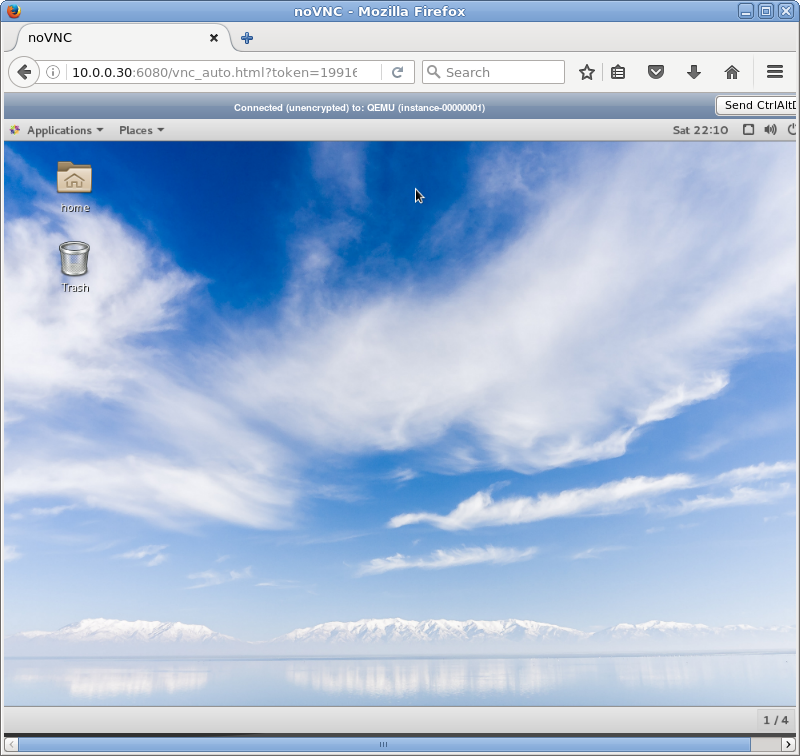
| [5] | It's possible to access with Web browser to get VNC console. |
|
[root@dlp ~(keystone)]# openstack server list +-----------+----------+--------+--------------------+------------+ | ID | Name | Status | Networks | Image Name | +-----------+----------+--------+--------------------+------------+ | 4b80dce6- | CentOS_7 | ACTIVE | network01=10.1.0.2 | CentOS7 | +-----------+----------+--------+--------------------+------------+[root@dlp ~(keystone)]# openstack console url show CentOS_7 +-------+---------------------------------------------------------------------------------+ | Field | Value | +-------+---------------------------------------------------------------------------------+ | type | novnc | | url | http://10.0.0.30:6080/vnc_auto.html?token=d6723851-dfde-4c8a-9b9f-0aa5c2b6916b | +-------+---------------------------------------------------------------------------------+ |
| [6] | Access to the URL which was displayed by the command above. |
|